

11 followers•2w ago
Auto Draw Using VituralInputManager l Made by me l Lunariel
-- [[ Credits ]] --
+ Made by Lunariel
+ Discord User : @lunarielz
+ Version : 1.1.5 (BETA) - READ THE INSTRUCTION CAREFULLY BEFORE USE !
+ XENO, SOLARA, LOW UNC EXECUTOR DOES NOT SUPPORTED !
-- [[ INSTRUCTION ]] --
BEFORE USING ! MAKE SURE YOU ARE EQUIPPED THE SPRAY BEFORE PRESS DRAW BUTTON. AND YOU MUST CHANGE UR BRUSH SIZE FOR GOOD PREVIEW !
1. Loading Images
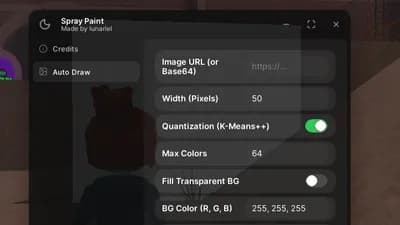
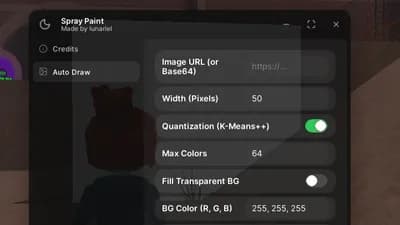
Paste a direct image URL or Base64 data into the Image URL box. Set your desired width, then click Load Image & Preview.
2. Resizing
Enter the exact width in pixels in the Width (Pixels) box (e.g., 50). The height will automatically adjust to keep the image's original proportions.
⚠️ Note: You MUST click Load Image & Preview again after changing the width to apply the new size!
3. Important Rules
⚠️ DO NOT touch your screen, move your mouse, or move your character while the script is actively drawing! The script takes control of your physical inputs (Virtual Input Manager) to draw accurately. Interfering will mess up the drawing.
4. PC Controls
Press P to Pause or Resume drawing.
Press V to Stop drawing completely.
(Tip: When paused, your character and camera are unlocked so you can move around. Just make sure to look back at the canvas before pressing P to resume!)
5. Mobile Controls
Use the on-screen PAUSE/RESUME and STOP buttons that automatically appear at the top of your screen while drawing.
For those who, after drawing an image in spray paint, always see random spots or the drawing doesn't fill completely, here are the reasons:
The FPS is too high. Because VirtualInputManager keeps up with 60 FPS, anything higher than 60 FPS will slow down VirtualInputManager and prevent it from filling everything. So, before drawing, set your FPS down to 60 FPS
It could be because you touched the screen or did something that caused VirtualInputManager to malfunction. And make sure (for phones) when setting a preview, avoid the pause and stop buttons and don't let the preview touch anything
-- [[ Features ]] --
[[ Auto Draw Tab ]]
[+] Auto draw with image URL
[+] Customize Image Size
[+] Quantizion Amount Colours
[+] Allow Fill Transparent BackGround
[+] Draw Method (DFS / Horizontal / Pixel by Pixel)
Spary Paint Auto Draw Support Asset ID MaxPixel 256px
❄️ Spray Paint!
28.7K views
Auto Draw Using VituralInputManager l Made by me l Lunariel
❄️ Spray Paint!
30.2K views
PNG Loader Auto Draw
❄️ Spray Paint!
57.1K views
OP Speed Draw! Script
Speed Draw!
1.9K views
HeadShot (SUPER OP)
[👑NEW] OVERKILL
20.3K views
SLIME RNG 50+ FEATURES HUB
Slime RNG
47.1K views
Spary Paint Auto Draw Support Asset ID MaxPixel 256px
❄️ Spray Paint!
28.7K views
Auto Draw Using VituralInputManager l Made by me l Lunariel
❄️ Spray Paint!
30.2K views
PNG Loader Auto Draw
❄️ Spray Paint!
57.1K views
OP Speed Draw! Script
Speed Draw!
1.9K views
HeadShot (SUPER OP)
[👑NEW] OVERKILL
20.3K views
SLIME RNG 50+ FEATURES HUB
Slime RNG
47.1K views
Comments
does velocity not work?
bro i use jjsploit and it crash and close my roblox
I wanna use madium but my fucking antivirus keeps deleting it, so I have to use Xeno
Script disabled?
This script is so good! I recommend it
U should totally do draw it better or draw space next
почему скрипт не работает в xeno
Can you make one for draw space?goat script 10/10
Does in Work on Madium?