Views: 22.8KExecutions: 56ExecutionsHow many times people ran this script. Copying it, downloading it or running it with the raw link all count. Max 10 per person a day.

- Keyless
- Mobile untested
Advertisement
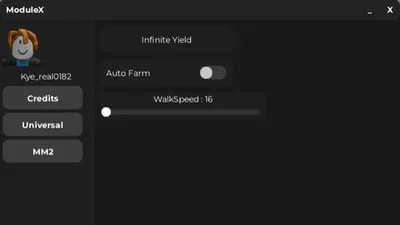
I tried to script a UI Library, First time, send comments on what to add next it right now has buttons and etc. I got inspired by rayfield to try to do one of these. Some feature might not work. Ive only tested this on Xeno so idk about other executors. The slider color must come before the slider or else the slider wont work.
Module X SetUp Commands
UI:Window(WindowText)
UI:SetLoadingText(LoadingText)
UI:SetCreditsText(CreditsName)
UI:CreateTab(TabName)
UI:AddButton(TabName, Button name)
UI:AddToggle(tabName, text, defaultState)
UI:AddSlider(tabName, text, min, max, defaultValue)
UI:SetSliderColor(color)
How to use
UI:AnyCommand("")
SilderColors:
Red = Color3.fromRGB(255,0,0)
Blue = Color3.fromRGB(0,170,255)
Green = Color3.fromRGB(0,255,0)
Yellow = Color3.fromRGB(255,255,0)
Purple = Color3.fromRGB(179,2,255)
Advertisement
48 lines · 1.4 KB
Share what works, ask questions, or report an issue.
No comments yet. Be the first to share your experience with this script.
![[UNPATCHED] Forsaken Hub - Best Legit & Rage Configs (No Key](/_next/image?url=%2Fassets%2Fgames%2F83645629621104-thumb-2e50994ec0291547.webp&w=3840&q=75)