
Views: 47.8KExecutions: 571ExecutionsHow many times people ran this script. Copying it, downloading it or running it with the raw link all count. Max 10 per person a day.

- Key required
- Mobile untested
Advertisement
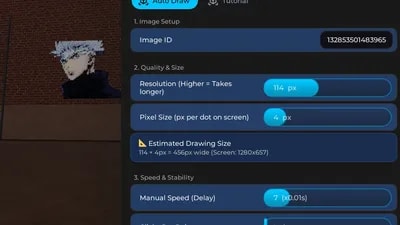
1. Image Setup
Image ID: Input field for the Roblox Asset ID.
Ignore White Background: Toggle to skip white pixels (saves time).
2. Quality & Size
Resolution: Quality level (Higher = more detail, takes longer).
Pixel Size: Adjust the size of the image to be drawn.
EstimatedDrawing Size : You can calculate the px value relative to your screen.
3. Speed & Stability
Manual Speed: Manual speed control (Lower value = Faster drawing).
Clicks Per Point: Clicks per dot (1 = Continuous Drag, 2+ = Multi-Click Stability).
4. Controls
Load Image: Processes the image data (Required before drawing).
Start Drawing: Begins the drawing loop (5-second countdown).
Cancel / Stop: Immediately stops the drawing process.
Equip Spray Can: Automatically equips the spray tool to your hand.
Hotkeys
F6: Emergency stop hotkey.
Advertisement
Tap a chip for community notes
Share what works, ask questions, or report an issue.
TheMenMir
I don't know where am I aiming at when it load pictures can you just add the picture and you can drag them to any spot it sometimes end up nowhere and it keeps clicking to any UI
TheMenMir
I don't know where am I aiming at when it load pictures can you just add the picture and you can drag them to any spot it sometimes end up nowhere and it keeps clicking to any UI
Cooldudd123
This doesn't work btw, when i enter the roblox asset id and click load image it says error and when I try to hit start drawing it says something in Arabic. So this is just a another shitty one.
TungtungGod
Is this a bug or I did something wrong when I click draw it keep kicking me from the game idk why please answer
10 lines · 506 B

Pearl_scriptsVerified❄️ Spray Paint!
HUXPACK❄️ Spray Paint!

boblee❄️ Spray Paint!
HUXPACK❄️ Spray Paint!

PuckAFKRoll A Stickman!
