
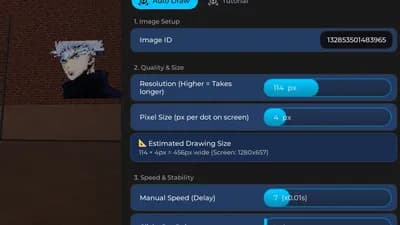
Spary Paint Auto Draw Support Asset ID MaxPixel 256px
❄️ Spray Paint!
1d ago
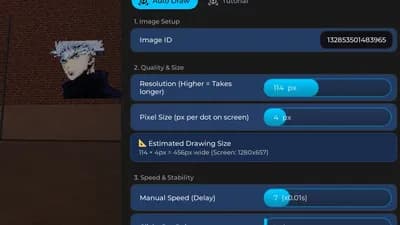

Description
1. Image Setup
Image ID: Input field for the Roblox Asset ID.
2. Quality & Size
Resolution: Quality level (Higher = more detail, takes longer).
Pixel Size: Adjust the size of the image to be drawn.
EstimatedDrawing Size : You can calculate the px value relative to your screen.
3. Speed & Stability
Manual Speed: Manual speed control (Lower value = Faster drawing).
Clicks Per Point: Clicks per dot (1 = Continuous Drag, 2+ = Multi-Click Stability).
4. Controls
Load Image: Processes the image data (Required before drawing).
Start Drawing: Begins the drawing loop (5-second countdown).
Cancel / Stop: Immediately stops the drawing process.
Equip Spray Can: Automatically equips the spray tool to your hand.
Hotkeys
F6: Emergency stop hotkey.
Tags
script Spray PaintSpary Paint scriptroblox script


![Pocong: Cursed Hospital [Beta] [Scary Horror] Best Script](/_next/image?url=%2Fassets%2Fscripts%2F69b04906a807137dc79bb8e3_1773816096461_ay9lSgkB64_0.webp&w=828&q=75)


Comments
No comments yet
Be the first to share your thoughts!