
Views: 49.7KExecutions: 1.9KExecutionsHow many times people ran this script. Copying it, downloading it or running it with the raw link all count. Max 10 per person a day.

Copy it, then tell others if it worked.
- Key required
- Mobile friendly
Advertisement
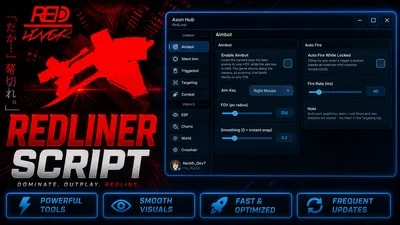
Aimbot, Triggerbot, ESP, Chams, Movement, Crosshair, Player Teleports & Combat Utilities
Dominate every fight in RedLiner with the cleanest Axon Hub script built for fast-paced FFA combat. This script is designed around RedLiner’s sword, gun, parry, and movement-heavy gameplay, giving you a powerful all-in-one dashboard for aiming, visuals, movement, targeting, and player utilities.
Built with a smooth Fluent UI and full config saving, Axon Hub keeps everything organized, lightweight, and easy to control while you play.
🛠 Clean UI, smooth performance, and full combat control — toggle what you need, adjust your settings, and play with a sharper advantage.
Camera Aimbot
Locks your camera onto the best enemy target inside your FOV so your normal shots land more consistently.
Triggerbot
Automatically fires when your crosshair is over an enemy.
Combat Tools
Includes Kill Aura, auto-fire assist, auto-parry support, and enemy-facing helpers for close-range combat.
ESP System
Shows player boxes, names, distance, health, tracers, skeletons, head dots, and more.
Chams
Highlight players through the map with customizable enemy and outline colors.
Targeting Settings
Customize target priority, body part, max distance, wall checks, prediction, sticky targeting, and team checks.
Movement Utilities
WalkSpeed, JumpPower, Infinite Jump, Bhop, Fly, Noclip, Spinbot, Double Jump, and Anti-AFK.
Visual Tools
Fullbright, no fog, atmosphere controls, custom FOV circle, and custom crosshair settings.
Player & Server Tools
Player list, teleport to player, walk to player, spectate, rejoin, server hop, and copy Job ID.
Config Saving
Save and reload your preferred Axon Hub settings easily.
Advertisement

OvertimeREDLINER

pxl3REDLINER

SeltonmtREDLINER


ViltozzREDLINER


noir_rREDLINER
Tap a chip for community notes
Share what works, ask questions, or report an issue.
douse
instant banned me tttrash script don't use
KillerF
that shit instant banned me
abbcscripts
W script ( kinda confused about feature ) there should be a showcase
1 lines · 107 B