

69
WilonityHub is a utility script that helps automate item selling and makes items easier to find using ESP and rarity filters.
Features
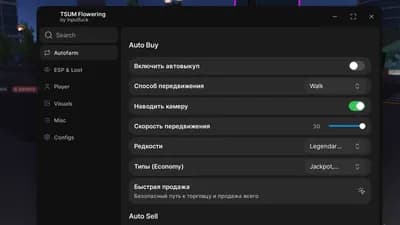
Enable Auto Sell — turns automatic item selling on or off.
Auto Sell Delay — sets how often the script sells items.
Sell Common — allows common items to be sold automatically.
Sell Uncommon — allows uncommon items to be sold automatically.
Sell Rare — allows rare items to be sold automatically.
Sell Epic — allows epic items to be sold automatically.
Sell Legendary — allows legendary items to be sold automatically.
ESP Enabled — shows items through the map/on the screen.
Distance — sets the maximum distance for item ESP.
Rarity Filters — lets you choose which item rarities are shown.
Common — shows common items in ESP.
Uncommon — shows uncommon items in ESP.
Rare — shows rare items in ESP.
Epic — shows epic items in ESP.
Legendary — shows legendary items in ESP.
How to use
Open your preferred Roblox executor on PC or mobile.
Launch Roblox and join TSUM, then wait until the game has fully loaded.
Copy the script code provided on this page.
Paste it into your executor and execute the script.
Wait for the script GUI to appear in-game.
Game Page
TSUM
Tap a chip for community notes
9 lines · 420 B




Comments
Join the discussion about this script.
No comments yet. Be the first to share your experience with this script.