### 🔍 Path_Copier — Convenient UI Spy and Interface Inspector
Looking for a quick way to find and copy the paths to any buttons in Roblox games? Path_Copier is a lightweight and functional UI spy designed specifically for developers, reverse engineers, and script creators.
The tool was created by gibkiy_morch and is entirely in English, making it convenient for global use!
---
### ⚡ Key Features:
* Generate exact paths: Instantly calculates the full path in Explorer (e.g., game.Players.LocalPlayer.PlayerGui...) for any pressed button.
* Automatic capture: Automatically finds all existing buttons on the screen, as well as new buttons that appear dynamically.
* One-click copy: Uses your injector's functions setclipboard / toclipboard) to instantly save the path to the system clipboard.
* Backup: If your exploit doesn't support the clipboard, the path is displayed in a safe text field, from where it can be copied manually Ctrl+C).
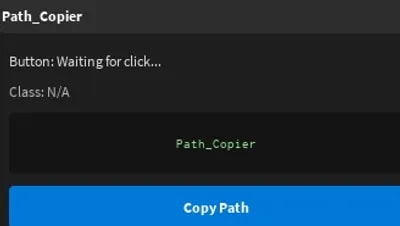
* User-friendly interface: A beautiful dark menu with movable options and a "UI Spy" minimize button to keep the script from obscuring your view.
* Reset protection (CoreGui): Places in CoreGui (if supported), preventing the menu from disappearing after your character's death.
---
### 🛠️ Instructions for use:
1. Run the script through any working injector.
2. Press any button in the game interface.
3. The Path_Copier window will open with the button's name, class, and full path.
4. Click the "Copy Path" button and paste the copied path into your script!
--
Script author: gibkiy_morch