
1.7K
## Wyrm — Shindo Life
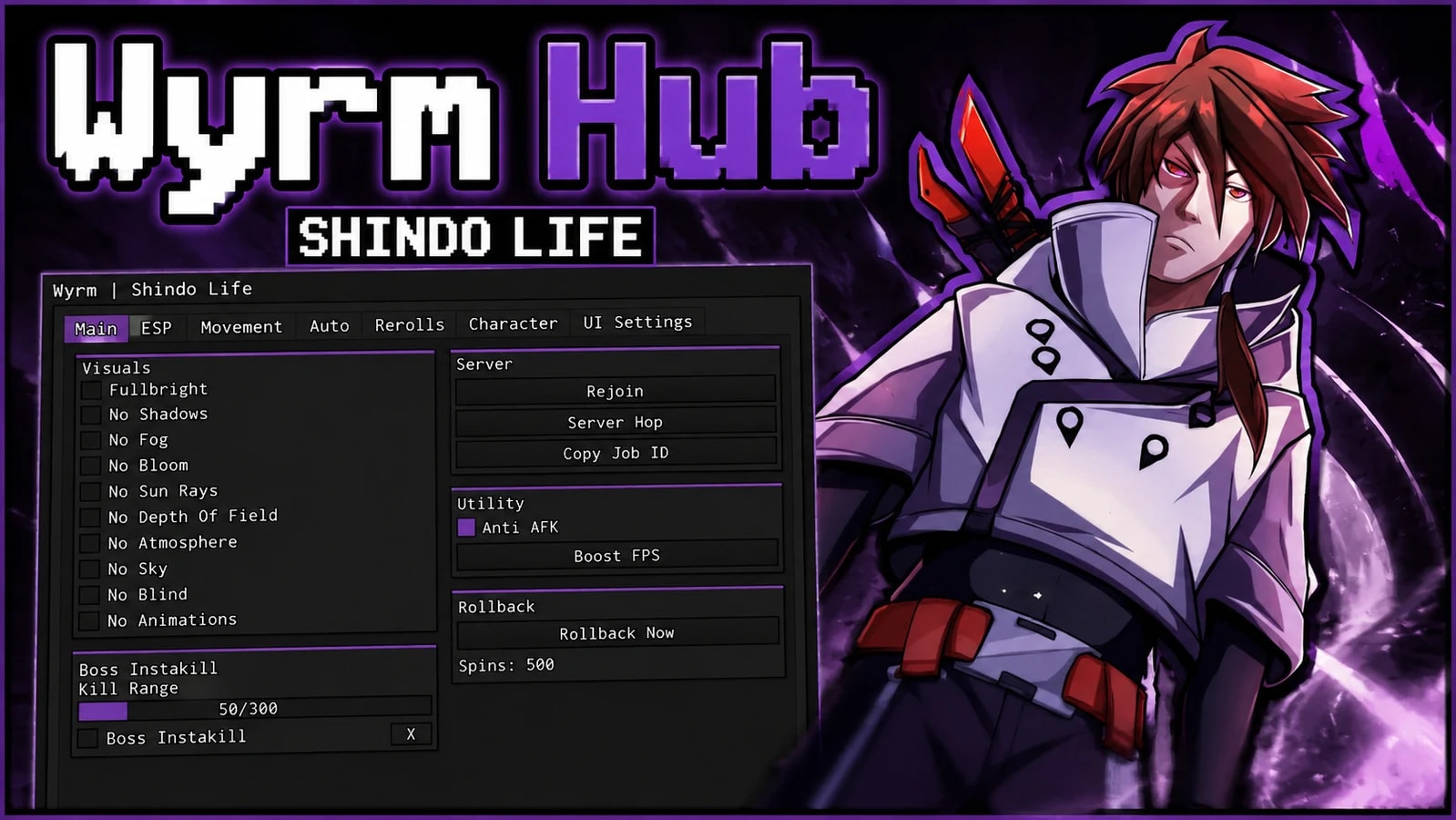
A Shindo Life script built around the stuff that actually eats your time — rerolling bloodlines and elements, farming bosses and scrolls, and collecting scrolls off the ground. It also has a full ESP, movement set and a morph system.
Detects the game on execute and loads only what that game needs. Shindo Life and Project Smash have their own feature sets, anything else falls back to a universal menu.
## How To Use
1. Execute the script with any executor
2. Press End to show or hide the menu
3. Tabs across the top — Main, ESP, Movement, Auto, Rerolls, Character, UI Settings
4. Set things up once, then save it as a config and mark it autoload so it comes back every injection
Nearly every toggle can be bound to a key, and your reroll settings persist across rejoins on their own so a rollback doesnt wipe what you had selected.
## Rerolls
Four bloodline slots and four element slots, all independent.
* Reroll Slot 1-4 for bloodlines, Reroll Element 1-4 for elements
Each slot has its own Stop On* list — multi select and searchable, and its built from the games own list at runtime so every bloodline and element in the game is in there, always up to date
* Pick as many as you want per slot, it stops the moment any of them lands
* Spin Delay slider shared across all of them
Live Current:* readout per slot so you can see what it rolled and whether its on cooldown
* Rerolls left counter
* Kick On Found — drops you out the second you hit one of your picks. leave this on
Auto Rollback
Rerolling costs spins. Rollback deliberately breaks your save so the server hands you back an older copy of your character — the one from before you spent them. You come back in with your spins restored and keep rolling.
* Rollback Now button on the Main tab for a manual one
* Auto Rollback with a Rollback At Spins slider, fires on its own once you drop to that number
* Requeues the script on teleport so the hub reloads itself after the rejoin
* Only runs while a reroll slot is actually on, waits 20s after load, and shuts itself off if your spins never went above the threshold so it cant loop forever on an account with none
This is why Kick On Found matters. If you roll the bloodline you wanted and then get rolled back, you lose it. Kicking immediately makes the good roll save before anything can undo it.
## Auto
* Auto Bosses — accepts the nearest ready boss mission, teleports to the boss and attacks it. Max Boss Distance, Attack Delay and Accept Delay sliders, plus Cancel After which drops a mission if the boss never spawns (0 turns that off). Turns Boss Instakill on while it runs and puts it back how you had it after
* Auto Collect Scrolls — finds dropped scrolls, teleports to each one and picks it up. Max Scroll Distance slider and Return After Collect to put you back where you started
* Auto Prestige — waits until level 1000, then walks to the Rank NPC, clicks through the dialogue and confirms it for you. Pauses the boss farm while it does, then puts you back where you were
* Boss Instakill with a Kill Range slider, bound to X by default
## Webhooks
Two separate ones, so filling in one does not fill the other.
* Rerolls tab — posts an embed every time a slot lands one of your picks
* Auto tab — posts every new scroll you unlock, with your Ryo, Spins and RELL Coins at the time
Paste a URL and it checks the webhook is real and tells you its name, or tells you exactly what was wrong.
## ESP
Four categories, each with its own color and keybind.
* Players — box (full or corner), health bar, name, distance, health %, tracer with a selectable origin, offscreen arrows, and Highlight Friends with its own colors
* Mob — same set for bosses and NPCs
* Scroll — finds dropped scrolls so you can see them through walls
* Boss Spawn — marks the mission givers so you know where to go
Every category gets a font dropdown, text size and max distance. Offscreen targets show as arrows on a ring around your crosshair, dead things get skipped, and the ESP hides itself where it would draw over the menu.
## Character
* Auto Stats — Health, Ninjutsu, Taijutsu and Chakra, dumps points into whichever you turn on. Live readout of your current mastery and points left
* Rewards — Check Pending tells you how much Ryo and Spins are waiting, Claim All Ready takes them, and Auto Claim Rewards does it on its own
* Morph — turn into Aizen Butterfly, Gojo, Kaneki, Megumin or Tung Tung Sahur. Swap between them with the toggle on, it reapplies after you die, and turning it off puts your real body back. Client side only, nothing is fired to the server and nothing about your account changes
* Anti Ragdoll and Anti Grip, both bindable
## Movement
* Fly with a speed slider, WASD plus space and shift
* Speed Hack with a walk speed slider
* Jump Boost with a power slider, and Infinite Jump
* Noclip
* Fling — pick a player, spin into them and launch them. Spin Speed and Fling Force sliders
* Attach — locks you behind a player with an offset slider
* Aim Lock — faces a player, pick the part (head, torso, root), with Smoothness and an FOV cone so it only engages when theyre actually on screen
All of it rebinds itself after you respawn, and unloading puts your speed, jump and rotation back to normal.
## Main
* Fullbright with a strength slider, No Shadows, No Fog, No Bloom, No Sun Rays, No Blur, No Depth Of Field, No Color Correction, No Atmosphere, No Sky
* No Blind — kills the flash and blind effects
* No Animations
* Rejoin, Server Hop and Copy Job ID
* Anti AFK, on by default
* Boost FPS — drops quality, shadows, particles and textures
## UI
* 8 built in themes — Default, BBot, Fatality, Jester, Mint, Tokyo Night, Ubuntu, Quartz
* Or edit the five colors yourself and save it as your own theme, then set it as your default
* Configs — save, load, overwrite, and set one to autoload on injection
* Shows your executor, and an Unload button that cleans everything up properly
Game Page
Shindo Life
Tap a chip for community notes
10 lines · 413 B

Shindo Life
Shindo Life

Shindo Life

Shindo Life

Shindo Life

Shindo Life

Comments
Join the discussion about this script.
Evenesce
works well
AL_MONASER
not working anymore