
Views: 46.6KExecutions: 2.4KExecutionsHow many times people ran this script. Copying it, downloading it or running it with the raw link all count. Max 10 per person a day.
Server finder

- Keyless
- Mobile untested
Advertisement
🌐 Void Servers v1 — Server Browser & Auto-Hop by @voiditic_456 • discord.gg/9XTXAseJ5r
wanted a proper server browser that actually showed useful info instead of just a list of player counts, so i built this. works in any game, just execute and hit continue.
what it does:
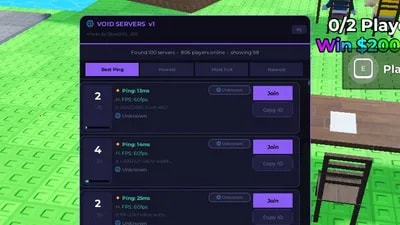
pulls all public servers for whatever game you're in and lists them as cards
each card shows player count with a fill bar, ping in ms (colour coded green/yellow/red), FPS, job ID, and the server's region with a flag
region pill badge on every card so you can see at a glance if it's EU, US, Asia, etc
highlights any server a friend is in with a yellow border and a friend badge
sort by best ping, fewest players, most full, or newest
load more button to fetch more pages of servers
auto-hop mode — toggle it on and it keeps scanning until it finds a server matching your current filters, then hops you there automatically
one click to join any server or copy its job ID to clipboard
rejoin button to get back into your current server
stats bar shows total servers found and total players online across all of them
needs:
request or http_request to fetch the server list from Roblox
setclipboard for the copy job ID button (optional)
works on pc and mobile. if it's not fetching servers your executor probably doesn't support http requests — check the functions page on the startup screen.
drop by the discord if you have any issues or ideas. Probably dont work on xeno/solara/etc .
Advertisement

YannieOnYTCruise Ship Simulator




thanhubtzySteal a Brainrot

DANYALSteal a Brainrot


benjaminfranklinSteal a Brainrot
Share what works, ask questions, or report an issue.
totallyoofedout
Btw when it says how many active its talking about how many active in total of how many servers are loaded, keep pressing load more to load more servers
totallyoofedout
Auto hop mode kinda broken and wont be worked on btw , any bugs can be reported in the discord :shush:
10 lines · 485 B
Tap a chip for community notes