
Views: 1.1KExecutions: 627ExecutionsHow many times people ran this script. Copying it, downloading it or running it with the raw link all count. Max 10 per person a day.
Copy it, then tell others if it worked.
- Key required
- Mobile untested
Advertisement
📦 FEATURES
💰 AUTO FARM
• Fully automated smuggle loop
• Buys → sells → launders on repeat
• Choose which item to farm from the menu
• Set how many items to buy per run
• Smooth tween teleport (looks legit, hard to detect)
• Auto-finds the nearest launder prompt
• Toggle on/off anytime mid-session
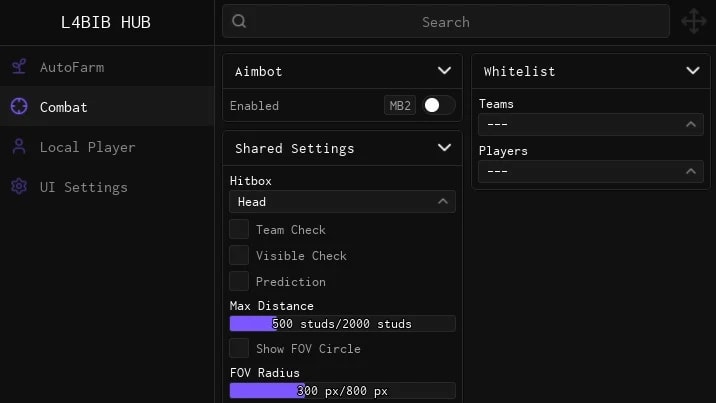
🎯 AIMBOT
• Silent aim assist — locks to nearest target in FOV
• Hold RMB (right click) to activate
• Choose which bone to lock onto (Head, Torso, etc.)
• Adjustable FOV circle size
• Adjustable max lock-on range
• Skip Teammates option
• Visible Only — only locks players you can see
• Bullet Prediction — leads moving targets
• Ignore specific players or teams
🏃 PLAYER MODS
• Speed Hack — move faster than normal
• High Jump — jump higher than the game allows
• Infinite Jump — jump again mid-air, no limit
• No-Clip — walk through walls and objects
━━━━━━━━━━━━━━━━━━━━━━━━━━━━━━━━━━━━━━━
📋 HOW TO USE
1. Open your executor and attach it to Roblox
2. Join the game
3. Paste the script into your executor
4. Hit Execute
5. The menu opens automatically
6. Press RIGHT SHIFT anytime to hide/show the menu
━━━━━━━━━━━━━━━━━━━━━━━━━━━━━━━━━━━━━━━
⚙️ AUTO FARM SETUP
1. Open the Auto Farm tab
2. Select your Target Item from the dropdown
3. Set your Buy Amount Per Run (1–10)
4. Check Enable Auto Farm
5. Walk away — the bot handles the full loop
━━━━━━━━━━━━━━━━━━━━━━━━━━━━━━━━━━━━━━━
🎯 AIMBOT SETUP
1. Open the Aimbot tab
2. Toggle Enable Aimbot ON
3. Set your Target Bone (Head recommended)
4. Adjust FOV Circle Size to your liking
5. Hold Right Click in-game to lock on
━━━━━━━━━━━━━━━━━━━━━━━━━━━━━━━━━━━━━━━
⌨️ DEFAULT KEYBINDS
RIGHT SHIFT → Toggle menu open/close
RMB (Mouse2) → Hold to activate aimbot
━━━━━━━━━━━━━━━━━━━━━━━━━━━━━━━━━━━━━━━
🔗 discord.gg/69M4csaYhb
━━━━━━━━━━━━━━━━━━━━━━━━━━━━━━━━━━━━━━━
Advertisement

missloSan Diego Border Roleplay

DiloktoSan Diego Border Roleplay

who1amSan Diego Border Roleplay


EasyScripterSan Diego Border Roleplay
Tap a chip for community notes
Share what works, ask questions, or report an issue.
No comments yet. Be the first to share your experience with this script.
10 lines · 506 B