Views: 371Executions: 230ExecutionsHow many times people ran this script. Copying it, downloading it or running it with the raw link all count. Max 10 per person a day.

Copy it, then tell others if it worked.
- Keyless
- Mobile untested
Advertisement
Advertisement
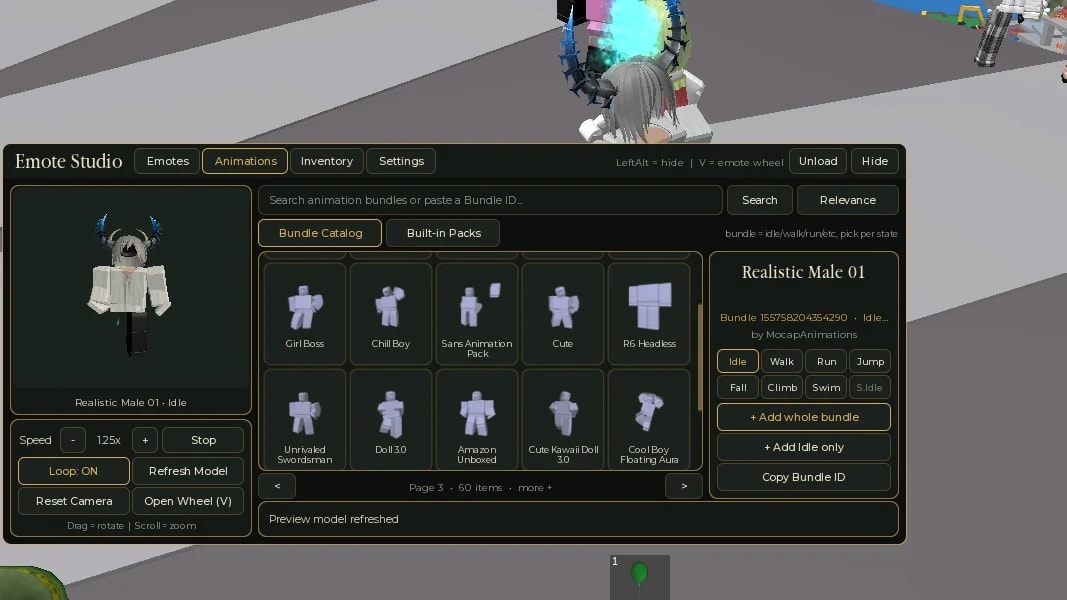
Emote Studio is a fully open source emote and animation changer with a live preview. Search emotes and animation bundles, preview them on your own avatar, and save everything to your inventory. Your setup is saved automatically and survives death, respawn, rejoin and re-execute.
Features
Live preview of your own avatar (drag to rotate, scroll to zoom)
Emote catalog search, or paste an asset ID directly
Animation bundle catalog and built-in packs (Ninja, Zombie, Robot, Levitation, Stylish, and more)
Mix animations per state: idle, walk, run, jump, fall, climb, swim from different bundles
Multi-page emote wheel (up to 12 pages, 8 slots each)
Auto-apply on spawn, plus an optional enforce mode that re-applies if the game resets your animations
Auto-save, so no setup needed after rejoin
Resizable window, drag the edges to resize
Rebindable keys in Settings (hide/show, wheel, page prev/next)
Unload button for a clean removal
How to use
Execute the script
Search an emote or bundle in the Emotes or Animations tab
Click an item, then press + Add to Wheel or + Add whole bundle
Open the Inventory tab to manage your wheel and loadout
Press RightShift to hide or show the GUI, and B to open the wheel (default)
Notes
Animation loadout works on R15 only
Games with a custom Animate script or anti-cheat may override your animations
Needs an executor with file functions (writefile/readfile) for auto-save
Free and open source, feel free to fork or learn from it
4.7out of 5 stars
1.8K reviews
100K+
Downloads


Advertisement
Share what works, ask questions, or report an issue.
No comments yet. Be the first to share your experience with this script.
10 lines · 476 B