
Views: 140Executions: 181ExecutionsHow many times people ran this script. Copying it, downloading it or running it with the raw link all count. Max 10 per person a day.

- Keyless
- Mobile friendly
Advertisement
OmniCat Script Documentation
Overview
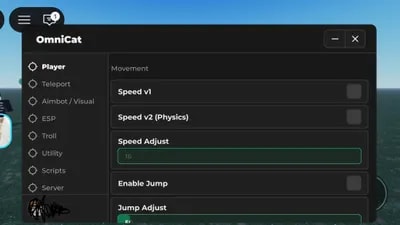
OmniCat is a multi-functional utility script for Roblox, featuring movement enhancements, combat assistance (Aimbot), visual aids (ESP), and various server-side utilities. It is built using the Orion Library for a clean, mobile-friendly interface.
Main Features
1. Player (Movement & View)
• Speed v1 & v2: Standard and physics-based walk speed modification.
• Jump Adjustments: Custom jump power, Infinite Jump, and Auto Jump.
• Noclip: Allows the player to walk through walls.
• View Modes: Toggle 3rd Person, Shift Lock (Mobile), and Lock First Person.
• Misc: Spin Bot and Walk Animation disabling.
2. Teleport (TP)
• Target TP: Select a player from a dropdown and teleport directly to them.
• Memory Pos: Save up to 3 specific coordinates and teleport back to them instantly.
• Follow/Orbit: Automatically follow or orbit around a target player at a set distance.
• Spectate: View the game from another player's perspective.
3. Aimbot / Visuals
• Aimbot (v1, v2, v3): Three different targeting modes including standard, smooth Lerp, and "Shortest Distance" logic.
• FOV Settings: Adjustable Field of View circle with custom colors and size.
• Crosshair: Highly customizable crosshair with RGB sync, rotation, and pulsing effects.
• Nametag: Custom nametag display for your own character.
4. ESP (Extra Sensory Perception)
• Highlight ESP: Outlines players through walls.
• FPS ESP: Color-coded outlines based on visibility (Green = Visible).
• Tracers: Lines connecting the center of your screen to other players.
• Health Bar: Display a dynamic health indicator above players' heads.
• X-ray: Makes map objects transparent to see through buildings.
5. Troll (Hitbox Expander)
• Expand All: Increases the size of every player's Hitbox (HumanoidRootPart).
• Target Mode: Expand the hitbox of only one specific player.
• Whitelist: Prevent specific friends from being affected by the hitbox expander.
6. Utility & Server
• RTA Timer: A built-in stopwatch for speedrunning or timing tasks.
• Instant Interact: Removes the "hold" duration for ProximityPrompts.
• Full Bright: Maximum brightness and no fog for clear visibility.
• Server Info: Displays Server Name, JobId, and Player Count.
• Rejoin/Hop: Quickly rejoin the current server or hop to a new public server.
Interface Controls
• Toggle UI: Click the floating OmniCat icon on the left side of the screen to hide/show the menu.
• Draggable Button: The toggle button can be moved to any position on your screen.
Advertisement
Share what works, ask questions, or report an issue.
No comments yet. Be the first to share your experience with this script.
11 lines · 459 B

TURKESHProject: Iron

McHackManCut a Rock



DonaNeves+1 Anime Eyes



ScriptGamingMALAM SAMA NENEK
TemploVerifiedFERAL 🐺 Animal Survival