
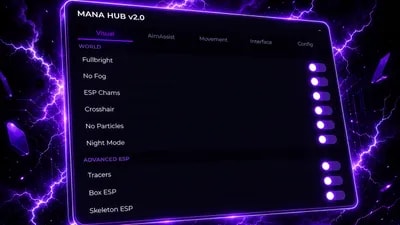
Views: 48.9KExecutions: 673ExecutionsHow many times people ran this script. Copying it, downloading it or running it with the raw link all count. Max 10 per person a day.

- Key required
- Mobile untested
Advertisement
ESP Highlights — Player highlights with configurable fill/outline
ESP Fill — Toggle fill on highlights
ESP Names — Show player names overhead
ESP Distance — Show distance to players
ESP Health Bars — Overhead health indicators
ESP Chams — Character chams through walls
Crosshair — Custom on-screen crosshair
Tracers — Lines from screen bottom to each player
Box ESP — 2D bounding boxes around players
Skeleton ESP — Skeleton wireframe overlay
Fullbright — Removes darkness/lighting effects
No Fog — Disables fog
Aim Assist Toggle — Enable/disable aim assist
FOV Mode — Camera (FOV circle centered on screen) or Mouse (FOV circle follows cursor)
Aim Keybind — Rebindable to any key or RMB (default: Right Click)
Hold to Aim — Aim only tracks while keybind is held
FOV Radius — Adjustable FOV circle size (10–500)
Smoothness — Aim lerp speed (1–20)
Target Part — Head, HumanoidRootPart, or UpperTorso
Show FOV Circle — Visual FOV circle display
Sticky Aim — Faster lock when re-targeting same player
Aim Prediction — Leads targets based on velocity
Team Check — Skip teammates (off by default)
Aim Shake — Adds humanized jitter (0–10)
Silent Aim — Silent aim module
Triggerbot — Auto-fire with configurable delay (0–500ms)
WalkSpeed — Toggle + slider (1–300)
JumpPower — Toggle + slider (1–300)
Noclip — Walk through walls (admin only)
Fly — Free flight with adjustable speed (1–300)
Infinite Jump — Jump mid-air
Anti AFK — Prevents idle kick
Auto Sprint
6 Themes — Midnight, Cyberpunk, Ocean, Emerald, Sunset, Frost
Rainbow Accent — Cycling accent color with adjustable speed
Compact Mode — Smaller toggle rows
Array List — Active modules sidebar display
Array Shimmer — Animated gradient on array list entries
Profile System — Create, save, load, delete profiles
Exit Hub — Clean shutdown
Keybinds — RightCtrl (minimize), RightShift (hide), Escape (drag mode), Semicolon (command bar)
Command Bar — Text commands for quick actions
FPS & Ping Display — Live stats in title bar
Draggable UI — Drag mode toggle for repositioning
Advertisement

luxarcArsenal
CrazenHubArsenal

ZergoPoopZergoPoopArsenal
CombsArsenal

ZRHUBArsenal
Tap a chip for community notes
Share what works, ask questions, or report an issue.
No comments yet. Be the first to share your experience with this script.
20 lines · 802 B