
Views: 956Executions: 195ExecutionsHow many times people ran this script. Copying it, downloading it or running it with the raw link all count. Max 10 per person a day.

Copy it, then tell others if it worked.
- Keyless
- Mobile friendly
Advertisement
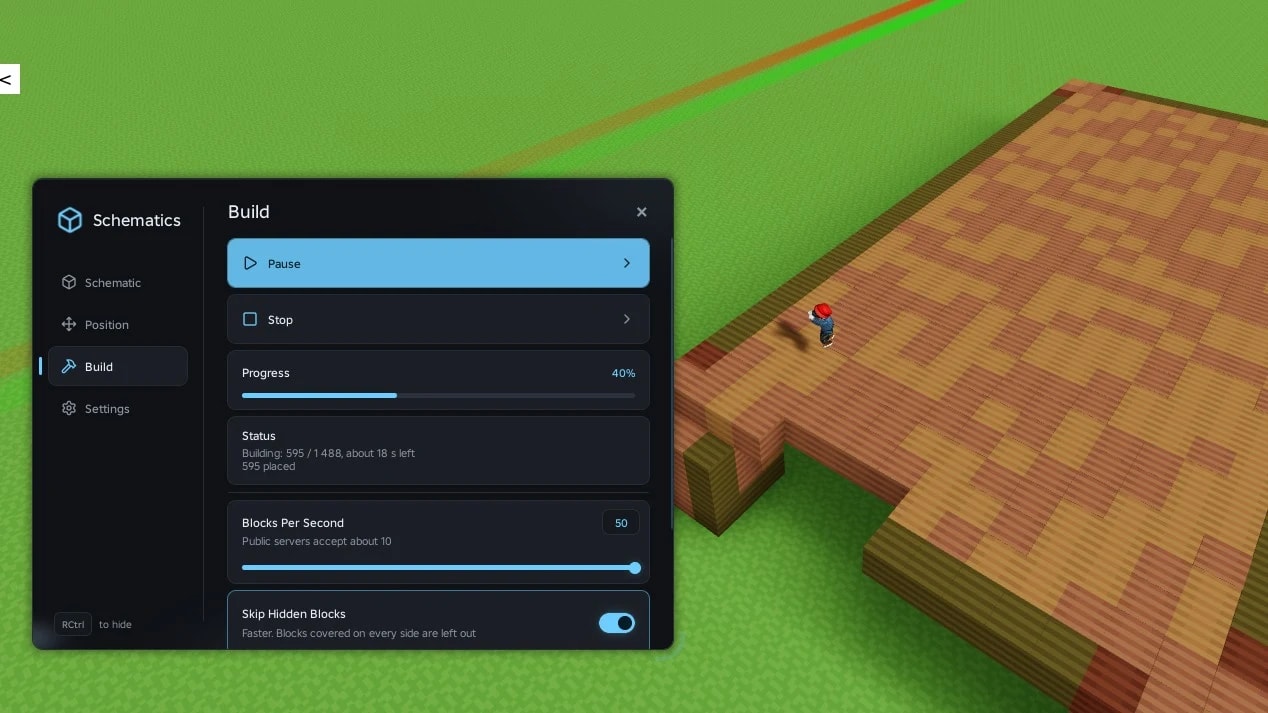
Script for the "Build with Voxels" game, allowing you to load Minecraft schematics
How to use:
1. Download or make any schematic: .litematic, .schematic, .schem or .nbt
2. Put the file into your executor's workspace folder
3. Run the script and pick the schematic from the list
Features:
• Preview of the build before placing it
• Move along X/Y/Z and rotate by 90°
• If the game doesn't have a block, it uses a similar one and lists the blocks that have no replacement
Advertisement
Share what works, ask questions, or report an issue.
vyrfz
your scripts are amazing man, much appreciated

Alfredo_scripter🌳 Lumber Tycoon 2

K0rdTreeHuss Valley


EtlerrProject Slayers

Beanie_boyBIG Paintball! Classic 🔫

RndmVerified🌳 Lumber Tycoon 2
2 lines · 162 B