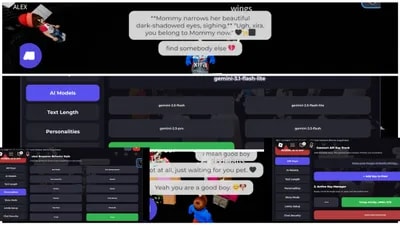
This universal script adds a menu that links your Roblox character directly to Google's Gemini AI. It is completely free to use.
Once you turn it on, the AI will listen to players standing near you and automatically type out replies on your behalf in the game chat. You can leave your keyboard or play the game while your character holds full conversations for you.
QUICK START INSTRUCTIONS
1. Get your free API key from this exact page:("https://aistudio.google.com/app/apikey")
2. Execute the script in-game with an executor?.
3. Go to the API Keys tab in the menu, paste your key, and click Add Key to Pool.
4. Choose a personality profile and click the big GLOBAL AI IS OFF button on the side to turn it on.
WHAT THE SCRIPT CAN DO
Talks for you: Automatically replies to nearby players using smart Gemini AI.
Custom Personalities: You can choose how the AI talks—make it sound like a regular chill player, a funny troll, a GenZ teen, a Femboy, or a protective friend.
Bypasses Hashtags: Includes built-in bypass tools like Cyrillic font substitution and a kid-friendly vocabulary toggle so the AI doesn't get tagged constantly.
Infinite Uptime: If you add multiple free keys from a few different Google accounts, the script automatically switches to the next key the exact second your current one runs out or hits a minute limit.
Story Mode: You can set it to ignore nearby players and just yap continuously about a deep story or explain a complex topic to the whole server.
Smart Memory: It remembers what specific players said to you earlier so the conversation actually makes sense and flows naturally. It also wipes memory when you switch profiles so the AI stops acting like the old character.
Moves and Emotes: Your character can automatically turn and walk toward whoever is talking to it, and even jump or wave.
Built-in AI Tester: Try out how your setup sounds using the Test AI tab before letting it talk to real players in the server.


![[Free Script] Resource Incremental](/_next/image?url=%2Fassets%2Fscripts%2F6a6197d07086c49f5ba8fc80_1784780754491_WSQZrcJHXW_0.webp&w=3840&q=75)