
Views: 48.8KExecutions: 1.2KExecutionsHow many times people ran this script. Copying it, downloading it or running it with the raw link all count. Max 10 per person a day.

- Keyless
- Mobile untested
Advertisement
How to use (Instructions)
Drop the file into the workspace folder, select it from the list, and find the settings for your file type at the bottom. Scroll down and find the settings for your file type.
To work with images:
Go to the Geometrize website.
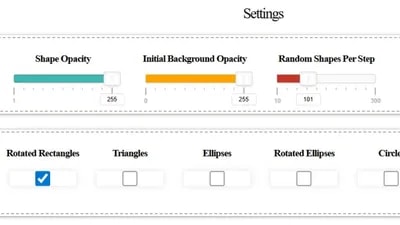
Important: Set the settings exactly as shown in the screenshot.
When everything is ready, click Save JSON and drop the file into the same workspace folder.
The Max Shapes Cap setting is your block limit. The higher the value, the better the detail, but it also takes a long time to load.
Advertisement

RicooooBuild A Boat For Treasure

NotascripterBuild A Boat For Treasure

ccvqooBuild A Boat For Treasure

Tyy8Build A Boat For Treasure

Share what works, ask questions, or report an issue.
material_cell3
Confusing 4 me
material_cell3
Confusing 4 me
Zorvixa
too much work for little timmies
10 lines · 473 B