
Views: 1.7KExecutions: 328ExecutionsHow many times people ran this script. Copying it, downloading it or running it with the raw link all count. Max 10 per person a day.

- Keyless
- Mobile untested
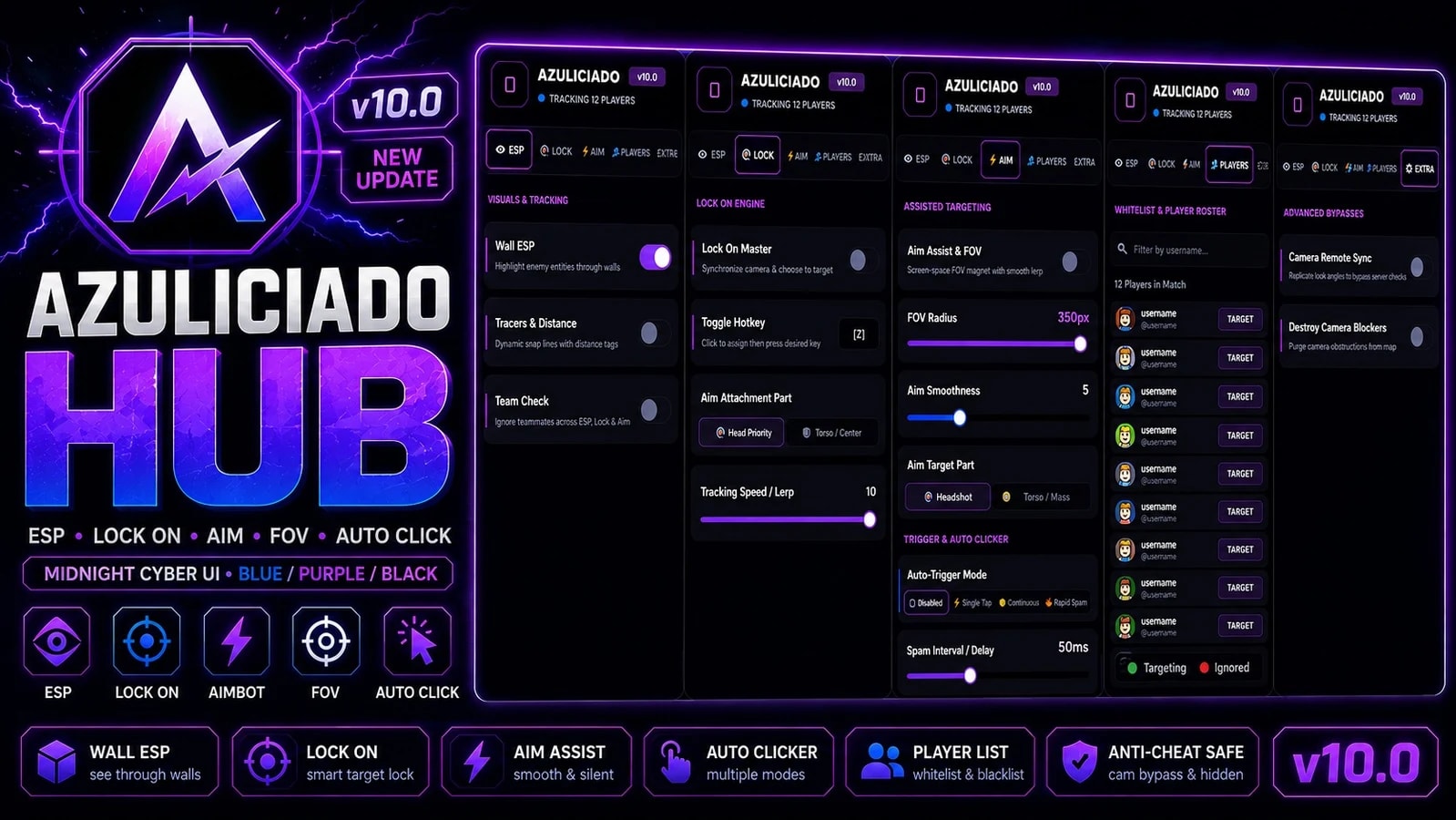
AZULICIADO HUB is a multi-tab player tracking and targeting interface with separate sections for ESP, Lock, Aim, Players, and Extra settings. The script keeps its settings in a central configuration system, so each control updates the corresponding feature while the hub is running.
👁 ESP & Tracking
The ESP tab focuses on player visibility and tracking:
Wall ESP — highlights tracked players through the environment.
Tracers & Distance — displays snap lines and distance information for tracked players.
Team Check — filters teammates from ESP, Lock, and Aim targeting when enabled.
🔒 Lock On
The Lock tab provides target-following controls:
Lock On Master — enables or disables the lock system.
Toggle Hotkey — lets the user assign the lock toggle key.
Target Part — selects which character area the system prioritizes.
Tracking Speed / Lerp — adjusts how quickly the tracking follows the selected target. The lock system is described in the script as synchronizing the camera and character toward a target.
🎯 Aim Settings
The Aim tab gives users control over targeting behavior:
Aim Assist — master toggle for the aim system.
FOV Radius — controls the size of the on-screen targeting area.
Aim Smoothness — adjusts how smoothly the aim transitions.
Aim Target Part — allows selection between the configured target areas.
Auto-Trigger modes — includes disabled, single, continuous, and rapid modes.
Spam Interval / Delay — controls the timing used by the auto-trigger feature.
👥 Players
The Players tab acts as a player roster and filtering system.
Users can:
Search or filter players by username.
View the current player list.
Change whether individual players are eligible for targeting or ignored.
Combine those individual settings with Team Check behavior.
⚙️ Extra
The Extra tab contains game-integration options such as:
Camera Remote
Clear/Destroy Camera Blockers
These are exposed as optional toggles in the hub. Because these features may interact with a game's internal systems or protections, users should only use and test them in environments where they have permission.
Launch the script and open the AZULICIADO HUB interface.
Use the navigation tabs to switch between ESP, Lock, Aim, Players, and Extra.
Turn individual features on or off with the switches.
Adjust sliders such as FOV, smoothness, tracking speed, and delay.
Use the Players tab to search the roster and configure individual targeting preferences.
Use Team Check if teammates should be excluded from tracking and targeting.
The interface also supports dragging the panel around the screen for easier positioning.
10 lines · 457 B
Share what works, ask questions, or report an issue.
No comments yet. Be the first to share your experience with this script.

vintedscriptsRIVALS

ErrdjdRIVALS

Mujtaba_playz9RIVALS
Sb87RIVALS
Miyabi_hubRIVALS
vintedscriptsRIVALS
Advertisement
Advertisement