
Views: 2.6KExecutions: 1.7KExecutionsHow many times people ran this script. Copying it, downloading it or running it with the raw link all count. Max 10 per person a day.

- Keyless
- Mobile friendly
Advertisement
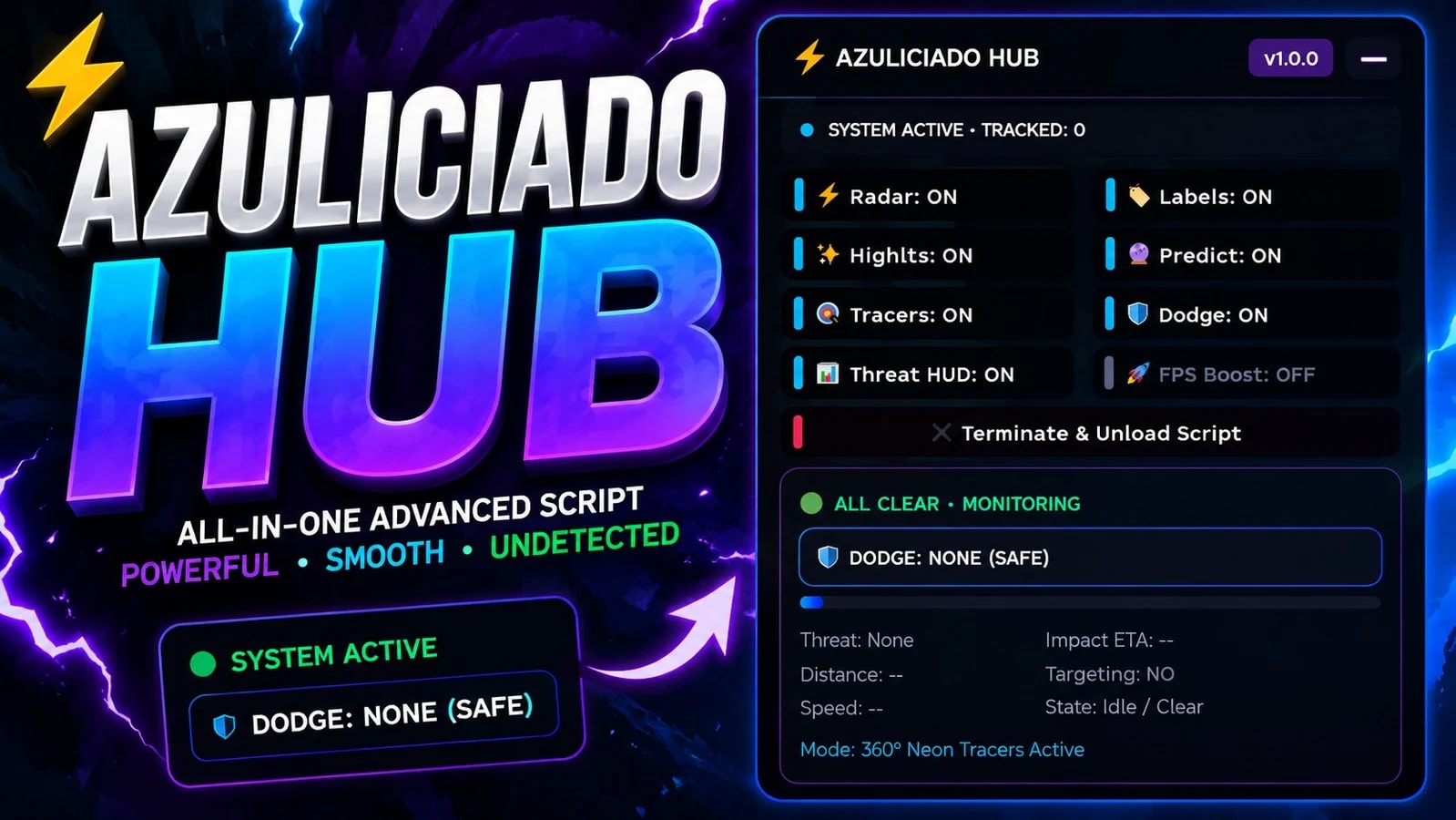
Azuliciado Hub is a Roblox visual tracking and threat-awareness hub designed to monitor projectile-like objects in the game world. It combines a cyberpunk-style control panel with radar visuals, movement prediction, threat analysis, dodge recommendations, and an optional FPS optimization mode.
Main Features
⚡ Radar — Scans for objects whose names match projectile-related keywords such as balls, projectiles, or attacks.
🏷️ Labels — Displays the tracked object's name above it.
✨ Highlights — Adds a visible outline so tracked objects are easier to identify.
🔮 Predictions — Uses the object's movement and velocity to estimate where it may travel next, showing multiple prediction points.
🎯 360° Tracers — Draws visual tracers between the player and tracked objects to make their position and movement easier to follow.
🛡️ Smart Dodge Advisor — Analyzes the object's trajectory and recommends Q for left, E for right, or R for forward based on which direction appears to provide the best clearance.
📊 Threat HUD — Shows live information including the current threat, distance, speed, estimated impact time, targeting status, and overall danger.
🚀 FPS Boost — Provides an optional performance mode that reduces certain visual effects and rendering details.
🦈 Smart Filtering — Filters out players, character-related objects, script-created visuals, and specifically blacklisted Shark-related objects to reduce false detections.
🗑️ Automatic Cleanup — Removes tracking visuals when an object disappears, becomes invalid, or matches an ignored category.
How it works
The hub continuously checks the Roblox workspace for potential targets. When it finds a valid object, it tracks its position and velocity, then updates the visuals in real time.
For each tracked object, the system can:
Calculate its speed and direction.
Estimate its future position using multiple prediction intervals.
Check whether it is moving toward the player.
Calculate the closest predicted approach and estimated time until impact.
Score the threat level based on factors such as distance, speed, trajectory, and targeting.
Recommend an escape direction by comparing left, right, and forward positions while also considering obstacles through raycasting.
The system also uses hysteresis, meaning it tries not to rapidly switch between dodge recommendations when two directions have very similar scores.
How people can use it
Users interact with the AZULICIADO HUB control panel and can individually turn features on or off:
Radar • Labels • Highlights • Predictions • Tracers • Dodge Advisor • Threat HUD • FPS Boost
The interface also displays how many objects are currently being tracked and provides a Terminate & Unload Script button to cleanly remove the hub and its visuals.
In simple terms, Azuliciado Hub acts like a real-time visual awareness system: it finds relevant moving objects, shows where they are, predicts where they are heading, estimates how dangerous they are, and gives the user a visual recommendation for how to react.
Advertisement

ShuffleDodge or Die

CMHUBDodge or Die

VGXMODDodge or Die
indrahubVerifiedDodge or Die

187VerifiedDodge or Die

cosxDodge or Die
Share what works, ask questions, or report an issue.
sev00
this shit looks like its made by AI
Jmoneym
U got a discord server ?
10 lines · 457 B