
Views: 812Executions: 375ExecutionsHow many times people ran this script. Copying it, downloading it or running it with the raw link all count. Max 10 per person a day.

- Keyless
- Mobile friendly
Advertisement
This script is intended to automate word-based minigame in Keybaord Wars
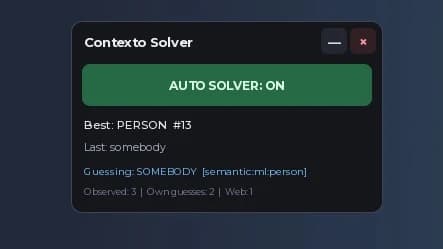
Automated Farming: Enabled, it continuously performs background tasks to quickly and automatically claim event rewards and process letters for you to save you the trouble of doing it yourself.
Adjustable Speed: You can set how many background workers to use to adjust the intensity.
Compact GUI: Has a compact movable floating window with options to minimize the view or completely shutdown the automation.
How to Use It
Execute the Script : Execute the script using the game executor of your choice, and you will see the GUI.
Moving the GUI : Click and drag the top title bar to move the GUI to a preferred location on your screen.
Changing Background Workers Amount : If you would like to change the amount of background workers please type in your desired amount to the input box. Your choice will be saved automatically.
Turning the Script On/Off : To turn the script on or off simply click the main button.
Minimizing/maximizing the GUI : You can click the - (minus) button to minimize or maximize the GUI.
Closing the GUI and Stopping the Script : Simply click the X (close) button to close the GUI, stop the background workers and clear your screen of unnecessary junk.
Advertisement
Tap a chip for community notes
Share what works, ask questions, or report an issue.
MJHakcs
W Good scrept


030VerifiedKeyboard Wars


SyneX1Игра в Слова

nyaa🤔Hot or Cold: Guess the Word!

Vortexscripts_Anime Expeditions


Seltonmt+1 Wings for Brainrots 🦅
39 lines · 1.2 KB