Views: 42.6KExecutions: 211ExecutionsHow many times people ran this script. Copying it, downloading it or running it with the raw link all count. Max 10 per person a day.

Copy it, then tell others if it worked.
- Key required
- Mobile friendly
Advertisement
like it
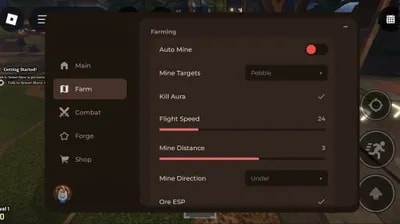
1. Autofarm
Autofarm system with position modes: Above, Under, or Off.
Select all Ore types with fine-tuned settings: – Adjustable distance to ores – Custom mining speed – Custom teleport delay – Custom movement (tween) speed – Automatic pickaxe swinging – Smart check to skip ores already being mined
World 2 [Forgotten Kingdom Island 2] – Lava-Safe Mode
Options: Off, Skip Rock, or auto-switch to Above.
Ore Priority
Assign each ore a priority rating (0–5). Higher-priority ores are always mined first.
Webhook
Choose which ores trigger Discord alerts
Enter your webhook URL
Set how often stats are sent
2. Combat
Combat system similar to Autofarm, with attack modes: Off, Above, or Under, and mob selector.
Set preferred combat distance
Adjustable movement speed during combat
World 2 [Forgotten Kingdom Island 2] – Lava-Safe Mode
Options: Off, Skip Mob, or auto-switch to Above.
3. Player
Movement and safety tools:
Noclip, Fly, Infinite Jump
Custom walk speed, jump power, gravity
Mod detection with auto-server-hop
Teleports to key locations in both worlds
Open the Forge
Redeem all Codes
4. Purchase & Inventory
Everything related to items and economy:
Buy and auto-use potions
Auto-buy system with configurable thresholds
Inventory scanner
Auto-sell selected ores/materials with adjustable amounts
Auto-fix for broken shop sessions
5. Visuals
ESP with +40 customization options:
Player/mob visibility
Chams
Fullbright
World lighting
Fog settings
And many more rendering options
6. Spoof
Visual spoofing tools:
Fake Level
Fake Money
Spoof types: Static, Custom Value, or Legit-Looking Random
7. Settings (Config & Advanced)
General and advanced options:
Save/load configs
Change menu keybind and theme
Server-hop, low-server hop, rejoin
Auto-inject on teleport
Extreme FPS boost mode
Optional black screen
Anti-AFK
Fully destroy/unload the UI
Advertisement

rapidshadow74The Forge

TeamUBVerifiedThe Forge


TNT_Elnecio015The Forge


Chiyo_scriptsThe Forge
Share what works, ask questions, or report an issue.
Garfyprod
better than all the other scripts
1 lines · 62 B