Views: 49.8KExecutions: 2.1KExecutionsHow many times people ran this script. Copying it, downloading it or running it with the raw link all count. Max 10 per person a day.

Copy it, then tell others if it worked.
- Key required
- Mobile friendly
Advertisement
Zenith Immortal — Feature List
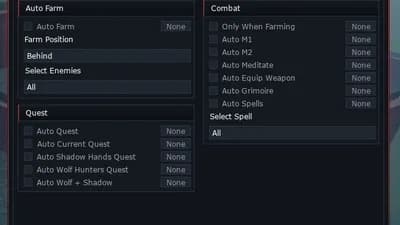
Auto Farm
Auto Farm — teleports to and farms the nearest valid enemy
Enemy Filter — pick specific enemies to target, or leave blank for all
Farm Position — choose to stand Behind, Above, or Below the enemy
Spectate Target — locks your camera onto the current farm target
Quest
Auto Quest — automatically follows and completes your active main quest
Auto Current Quest — detects your active kill quest and farms the required enemy
Auto Shadow Hands Quest — repeatedly accepts and completes the Shadow Hands quest on loop
Auto Wolf Hunters Quest — repeatedly accepts and completes the Wolf Hunters quest on loop
Auto Wolf + Shadow — alternates between Shadow Hands and Wolf Hunters quests indefinitely
Combat
Only When Farming — restricts M1, M2, and Spells to only fire while Auto Farm is active
Auto M1 — automatically uses your basic attack
Auto M2 — automatically uses your heavy attack
Auto Block — holds block permanently
Perfect Block — detects nearby enemy and player attack animations and blocks at the right moment
Auto Meditate — automatically meditates to regenerate resources
Auto Equip Weapon — keeps your weapon equipped and re-equips on respawn
Auto Grimoire — keeps your grimoire active
Auto Spells — automatically casts selected spells, aimed at your current target
Auto Union — maintains Devil Union state
Union % — controls the power percentage used for Union
Stat Dump
Auto Stat Dump — automatically spends skill points into your chosen stat
Stat selector — choose between STR, DEX, INT, or CON
Player
Custom Walk Speed — set a custom movement speed
Custom Jump Power — set a custom jump height
Fly — camera-relative flight with WASD, E to rise, Q to descend
Fly Speed — controls how fast you fly
Noclip — pass through walls and terrain
Infinite Jump — jump again mid-air as many times as you want
Anti Ragdoll — prevents your character from ragdolling when hit
Teleport to Cursor — right-click anywhere to instantly teleport there
Camera Lock — rotates your character to always face the current target
Custom FOV — set a custom camera field of view
Visuals
Enemy ESP — displays enemy name, health, and distance through walls
Chams — highlights enemies through walls with a coloured outline
Tracers — draws lines from your screen to each nearby enemy
Fullbright — removes all darkness from the world
No Fog — removes fog for maximum visibility
Crosshair — adds a simple crosshair to the centre of your screen
Teleports
Boss Spawns — scan and teleport to any boss spawn location
Enemy Spawns — scan and teleport to any enemy spawn location
Collectibles — scan and teleport to collectibles including TundraOre and GrasslandsOre
Quest NPCs — scan and teleport to any quest NPC
Special NPCs — scan and teleport to any special interaction NPC
Advertisement
Tap a chip for community notes
Share what works, ask questions, or report an issue.
konigo
key website takes ages to load
PedroGameryClover Retribution

BerkayVerifiedClover Retribution

tnoyoloVerifiedClover Retribution

Rainhub_DEVClover Retribution
Null_PointerClover Retribution
11 lines · 468 B