

Views: 14Executions: 15ExecutionsHow many times people ran this script. Copying it, downloading it or running it with the raw link all count. Max 10 per person a day.
- Keyless
- Mobile untested
## Universal Aimbot — Wall Check, ESP & Chat Commands
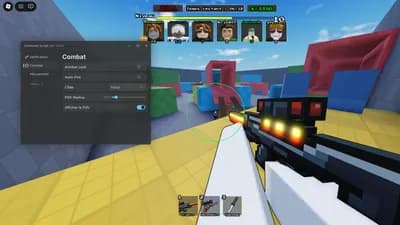
Lightweight universal aimbot that works in almost any Roblox game. Camera-based targeting with a toggleable wall check, full ESP and a complete chat-command system. No GUI, no key system, no external libraries.
### Features
- Camera lock onto the player closest to your crosshair
- Wall check: ON = only visible targets, OFF = locks through walls
- ESP with box, name, health and distance — toggleable any time
- Adjustable FOV radius, aim speed and prediction
- Team check, health check, max distance limit
- Chat commands for every setting
- FOV circle that turns green when a target is locked
- Clean unload, no leftovers
### How to use
1. Copy the script and execute it in your executor (Delta, Xeno, Fluxus, AWP).
2. Hold **Q** to lock onto a target. Change the key with `;key E` or switch to toggle mode with `;mode toggle`.
3. Type `;help` in chat to see every command.
### Commands
| Command | Action |
| --- | --- |
| `;help` | list all commands |
| `;aim` | enable / disable the aimbot |
| `;esp` | enable / disable ESP |
| `;espkey R` | bind ESP to a key |
| `;wall` | toggle wall check |
| `;fov 200` | FOV radius in pixels |
| `;speed 2` | aim speed (lower = smoother, higher = snappier) |
| `;pred 0.15` | movement prediction in seconds |
| `;part torso` | target part: head / torso / humanoidrootpart |
| `;team` | toggle team check |
| `;maxdist 400` | maximum target distance |
| `;mode toggle` | toggle mode instead of hold |
| `;circle` | hide / show the FOV circle |
| `;dbg` | diagnostic output |
| `;unload` | unload the script |
### Recommended settings
**Centaura**
10 lines · 461 B
Share what works, ask questions, or report an issue.
No comments yet. Be the first to share your experience with this script.










VavadragonsVerifiedRIVALS
Advertisement
Advertisement