Views: 5Executions: 11ExecutionsHow many times people ran this script. Copying it, downloading it or running it with the raw link all count. Max 10 per person a day.

- Key required
- Mobile friendly
Advertisement
🟣 VEXIUM HUB — RIVALS SCRIPT
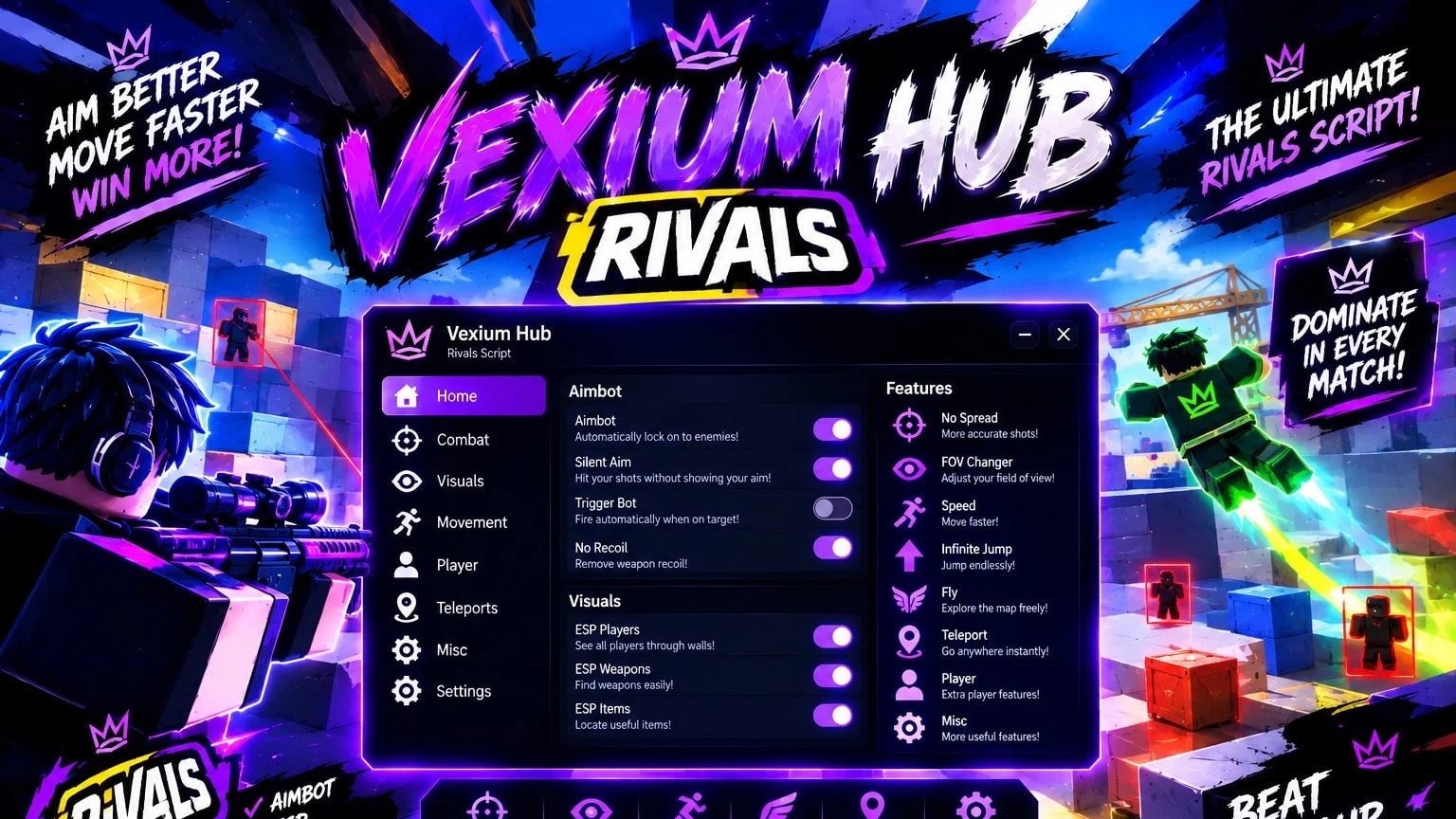
Welcome to VEXIUM HUB, a modern and feature-packed script hub created around the fast-paced world of RIVALS. With a futuristic purple-and-blue interface, organized categories, and a wide selection of combat, visual, movement, teleport, and player utilities, Vexium Hub brings everything together inside one clean and stylish hub.
Designed with speed, customization, and simplicity in mind, Vexium Hub gives you quick access to a variety of features while keeping everything organized in an easy-to-navigate interface.
🎯 AIMBOT
A targeting utility designed to assist with aiming and tracking opponents during fast-paced matches.
👁️ SILENT AIM
A combat-focused aiming feature designed to assist with target interaction while keeping your normal movement and aiming experience smooth.
✨ TRIGGER BOT
Automatically react when an opponent enters your crosshair area for faster combat interactions.
🎯 NO RECOIL
Reduce weapon recoil effects and keep your weapon handling more stable during fights.
🔫 AUTO SHOOT
Automate shooting interactions when a valid target is detected, helping create a faster and more automated combat experience.
🔵 ESP PLAYERS
Keep track of players around the map with configurable visual indicators.
🔫 ESP WEAPONS
Highlight weapons and important equipment so they can be located more easily.
📦 ESP ITEMS
Locate useful objects and items around the map with additional visual information.
🔭 FOV CHANGER
Adjust your field of view and customize the way you see the battlefield.
⚡ SPEED
Customize movement speed and navigate the map faster.
🦘 INFINITE JUMP
Add extra freedom to your movement by allowing repeated jumps.
✈️ FLY
Explore the map from above and move through the environment in a completely different way.
Teleport utilities allow you to quickly move between different locations and players.
Instead of spending unnecessary time traveling across the map, you can quickly access useful areas and change your position with ease.
Customize your overall player experience with additional utilities and movement options.
The Player section is designed to provide extra customization while keeping the main interface clean and organized.
The Misc category contains additional utilities and quality-of-life features that don't fit into the main sections.
It also provides space for future additions, updates, and new tools as Vexium Hub continues to evolve.
Vexium Hub isn't just about the features — the interface is designed to look just as good as it performs.
The hub uses a dark background combined with electric purple, blue, and white neon accents, giving it a futuristic RIVALS-inspired appearance.
Everything is separated into clear categories:
Home • Combat • Visuals • Movement • Player • Teleports • Misc • Settings
Simple toggles and organized menus make it easy to locate and configure the features you want.
RIVALS is all about quick reactions, movement, precision, and intense combat. Vexium Hub is designed around those same elements, bringing combat utilities, visual tools, movement options, and teleport features together in one centralized interface.
Whether you're experimenting with different configurations or simply exploring the available utilities, Vexium Hub gives you a large selection of options to customize your experience.
🎯 AIM. MOVE. REACT. DOMINATE.
AIMBOT • SILENT AIM • TRIGGER BOT • NO RECOIL • AUTO SHOOT • ESP PLAYERS • ESP WEAPONS • ESP ITEMS • FOV CHANGER • SPEED • FLY • INFINITE JUMP • TELEPORT • PLAYER • MISC
Fast interface.
Clean design.
Massive feature collection.
Built for the RIVALS experience.
Enter the arena, customize your setup, and experience a futuristic hub designed to put your preferred utilities directly at your fingertips.
🟣 VEXIUM HUB — RISE ABOVE THE RIVALS. 🔥
Advertisement
10 lines · 1.3 KB
Copying saves the code to your clipboard; it does not run it. Play opens the Roblox game. Check the script’s platform requirements and community notes before using it.
Share what works, ask questions, or report an issue.
No comments yet. Be the first to share your experience with this script.